What Is DocToAudio?
DocToAudio turns any document into an audiobook. Import a PDF, EPUB, or Word file — or paste text directly — and get back a professional audio file. With three TTS engines, built-in translation to 100+ languages, and speech-optimized output, it's the most versatile document-to-audio tool on Windows.
Multi-Format Import
Drag-and-drop or browse for PDF, DOCX, TXT, RTF, and EPUB files. Paste raw text for instant conversion. Supports all major document formats.
3 TTS Engines
Choose from Local Windows SAPI5 (offline), OpenAI (premium neural voices), or Edge TTS (free neural voices, no API key needed). Switch with one click.
Built-In Translation
Auto-detect the source language of your document, select any of 100+ target languages, and generate the audiobook in the translated language. Spanish book → English audiobook in one click.
Speech Optimizer
Before TTS generation, translated text is automatically optimized: abbreviations expanded, comma chains split, sentences restructured for natural narration.
Background Queue
Queue multiple document conversions and keep working while they process. Track progress, retry failed jobs, and pause/resume the queue at any time.
Audiobook Library
Browse, search, sort, and play completed audiobooks right in the app. Mark favorites, rename titles, open file locations, and delete with confirmation.
The DocToAudio Interface
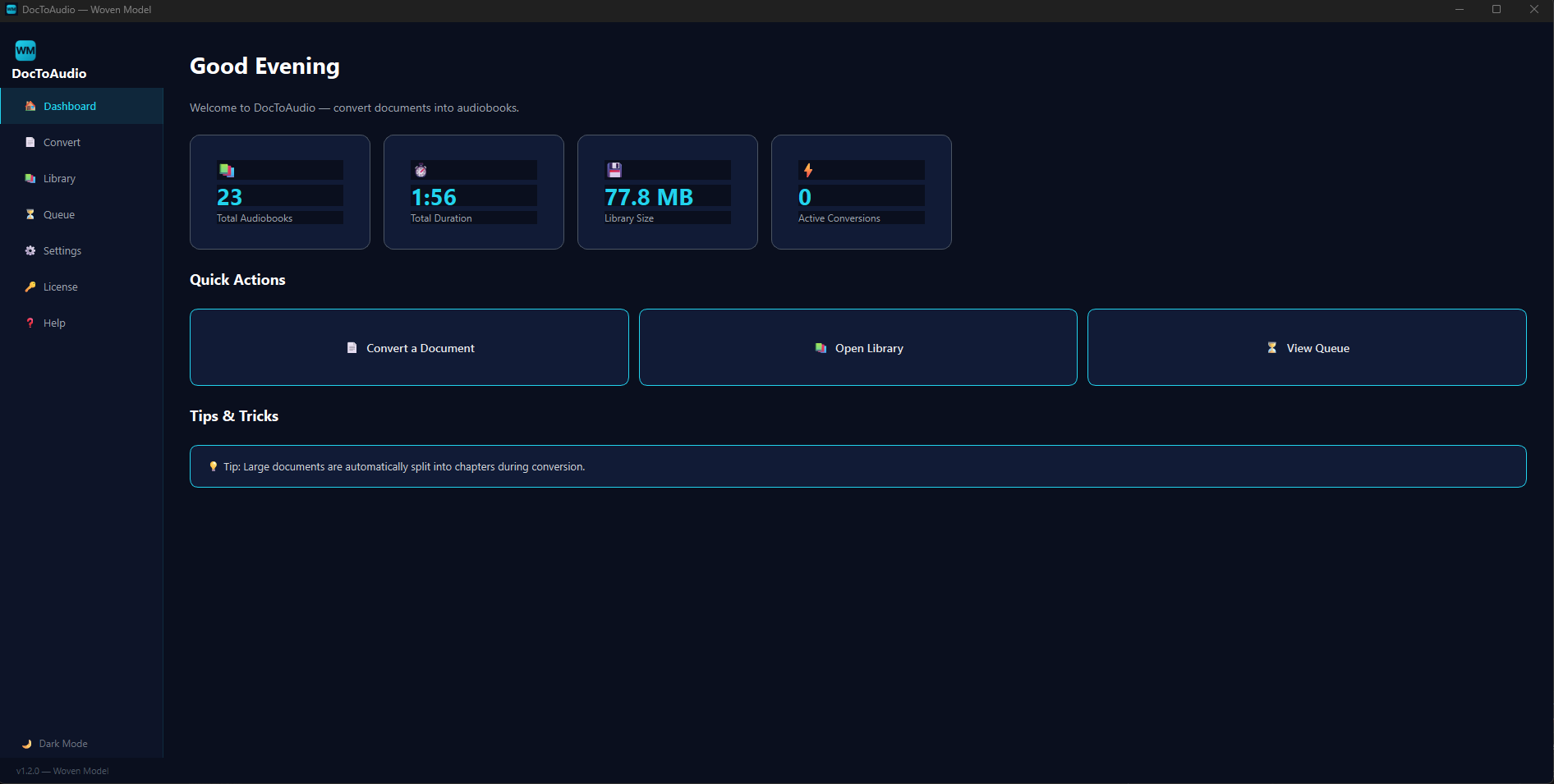
Dashboard
KPI cards showing total audiobooks, total duration, and storage used. Quick-action buttons and recent audiobook list.
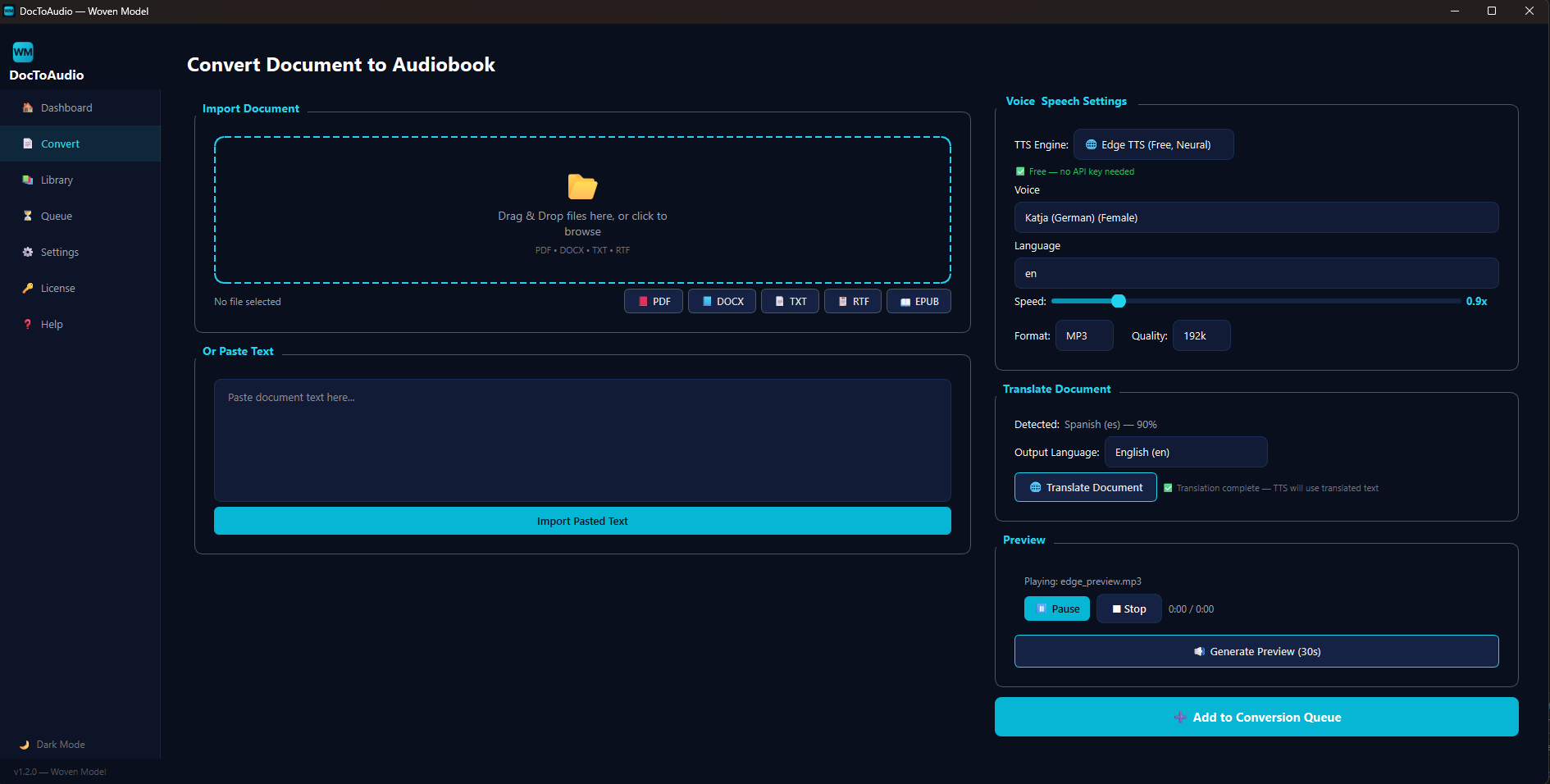
Convert + Translate
Document import, language auto-detection, target language selection, TTS engine/voice config, 30-second preview, and queue submission.
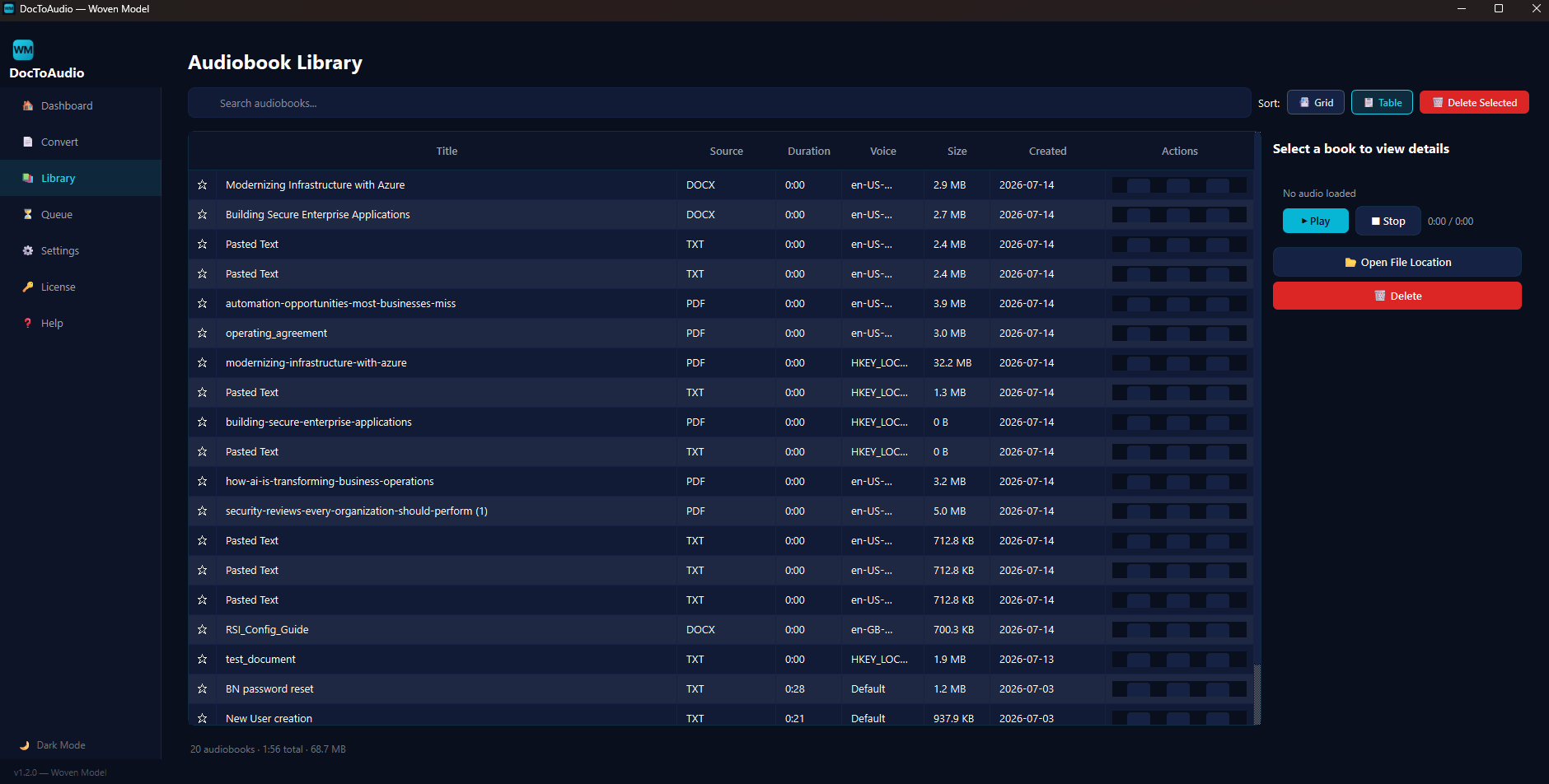
Library
Searchable table of all your audiobooks with columns for title, source, duration, voice, size, and creation date. Inline player and file management.
Every Feature, Explained
DocToAudio is a full-featured desktop application. Below is a complete breakdown of every tab and what it does.
Dashboard Tab
Purpose: At-a-glance summary of your conversion activity and library stats.
What You See
- KPI Cards (3): Total Audiobooks, Total Duration, Storage Used — auto-populated from your library
- Quick Actions: One-click navigation to Convert, Library, and Queue pages
- Recent Audiobooks: Last 5 converted books with play buttons and duration
Convert Tab
Purpose: The heart of DocToAudio — import, translate, configure TTS, preview, and queue.
Left Panel: Document Import
- Drop Zone: Drag-and-drop any supported file (PDF, DOCX, TXT, RTF, EPUB)
- Format Buttons: One-click file browser for each format
- Paste Text: Paste raw text for instant conversion without saving a file
- File Info: Word count, character count, and file size displayed after import
Right Panel: Translation (New)
- Detected Language: Auto-detected on file load (e.g., "Spanish (es) — 99%")
- Output Language: Dropdown with 17 common languages
- Translate Button: "🌐 Translate Document" — runs background QThread with progress
- On completion, translated text is TTS-optimized and used for audio generation
- Output filename includes target language (e.g., "MyBook (English).mp3")
Right Panel: TTS Configuration
- TTS Engine: Local SAPI5 / OpenAI / Edge (Free) — three providers in one dropdown
- Voice: Populated dynamically per provider
- Speed: Slider from 0.5x to 3.0x
- Pitch: Slider from 0.5x to 2.0x (hidden for OpenAI)
- Language: Multilingual for Local/Edge, English-only for OpenAI
- OpenAI Instructions: Tone and accent control for gpt-4o-mini-tts
- Format/Quality: MP3, WAV, or OGG at 128k-320k
Preview & Queue
- Generate Preview (30s): Listen before you commit. 120s safety timeout auto-resets the button
- Add to Queue: Submits the job — uses translated text if translation was completed
Library Tab
Purpose: Browse, search, play, and manage all completed audiobooks.
Features
- Table View: Columns for Favorite, Title, Source, Duration, Voice, Size, Created, Actions
- Search: Filter by title or source file name
- Sort: By Date, Title, Duration, or Size
- Actions: ▶ Play (opens in default media player), 📂 Open file location, ✏️ Rename
- Right-Click: Full context menu — Play, Open, Rename, Favorite, Delete
- Detail Panel: Double-click a book for detailed info + inline audio player
- Grid/Table Toggle: Switch between list and card views
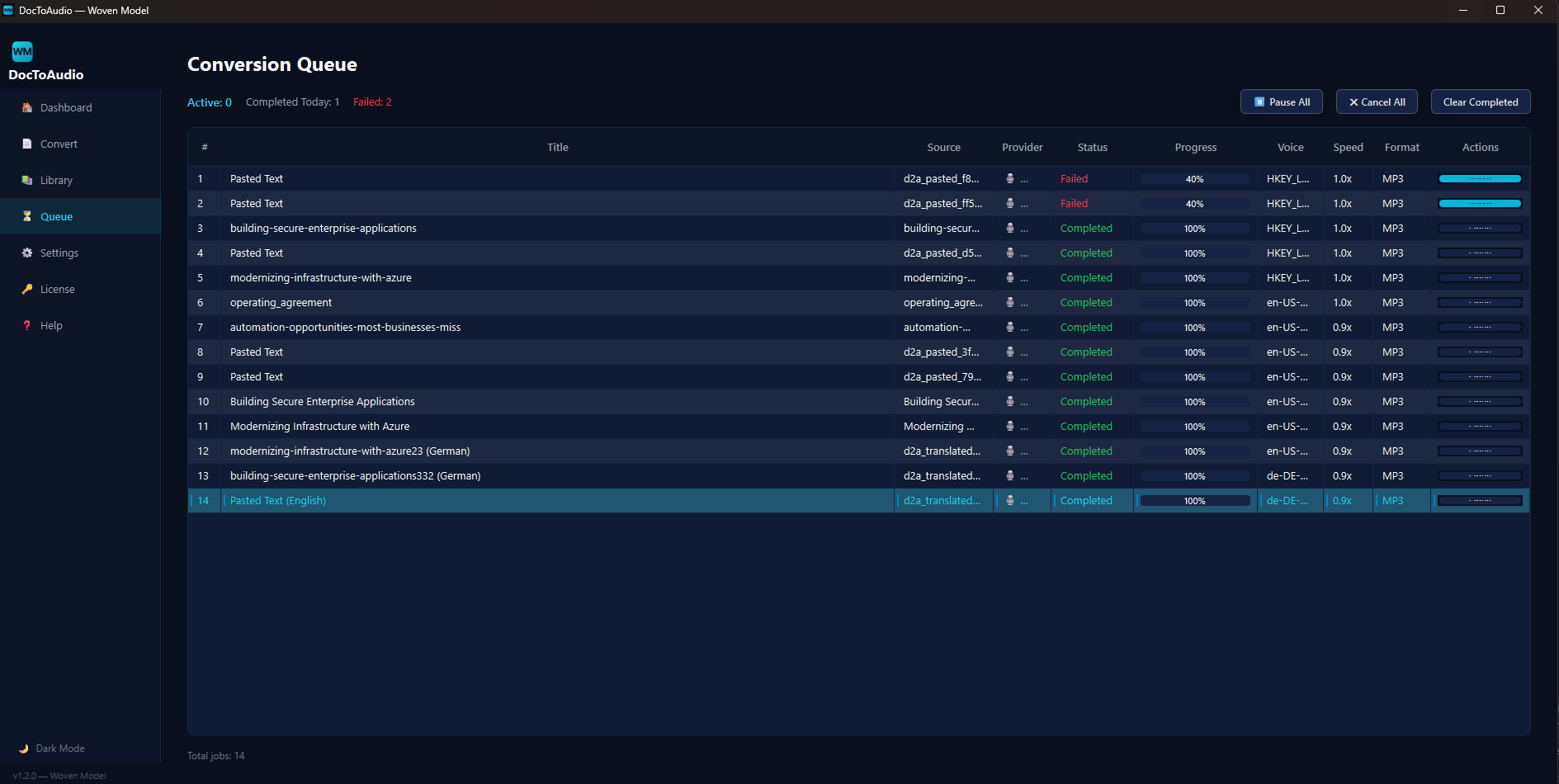
Queue Tab
Purpose: Monitor and manage active, completed, and failed conversions.
Features
- Auto-Refresh: Table updates every 2 seconds
- Columns: #, Title, Source, Provider (🎙️/☁️/🌐), Status, Progress Bar, Voice, Speed, Format, Actions
- Status Bar: Active count, Completed Today, Failed count
- Controls: Pause All, Cancel All, Clear Completed
- Per-Job: Cancel (queued/converting), Retry (failed), Open (completed)
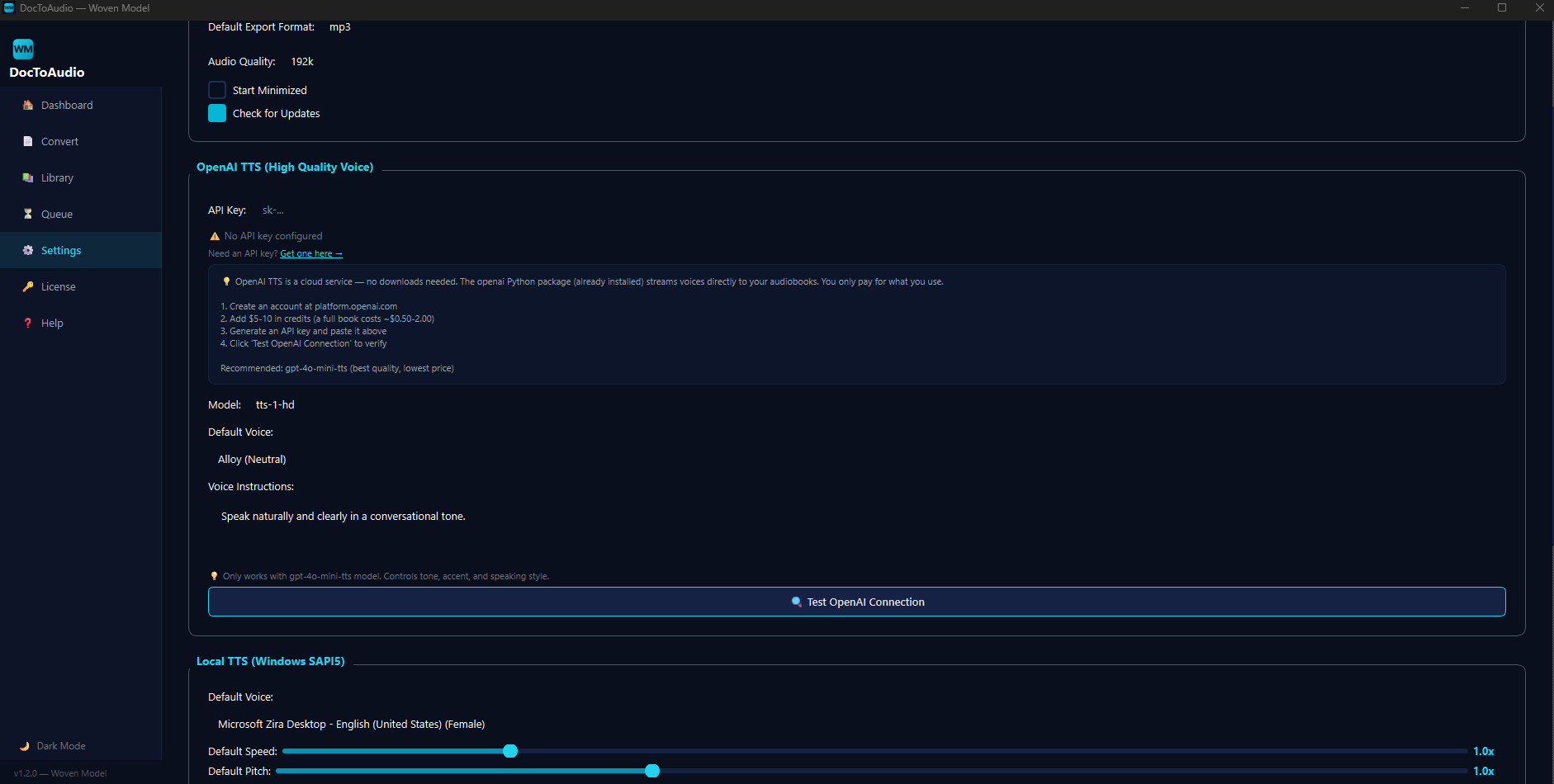
Settings Tab
Purpose: Configure all app preferences — output folder, TTS defaults, API keys, theme.
Sections
- General: Output folder, default format, audio quality, startup behavior
- OpenAI TTS: API key entry (with show/hide), model selection (gpt-4o-mini-tts, tts-1, tts-1-hd), default voice, voice instructions, Test Connection button with setup guide
- Local TTS: Default voice, speed, pitch, language
- Appearance: Theme (Dark/Light), Large Text, High Contrast modes
- Licensing: Current license status + Manage License navigation
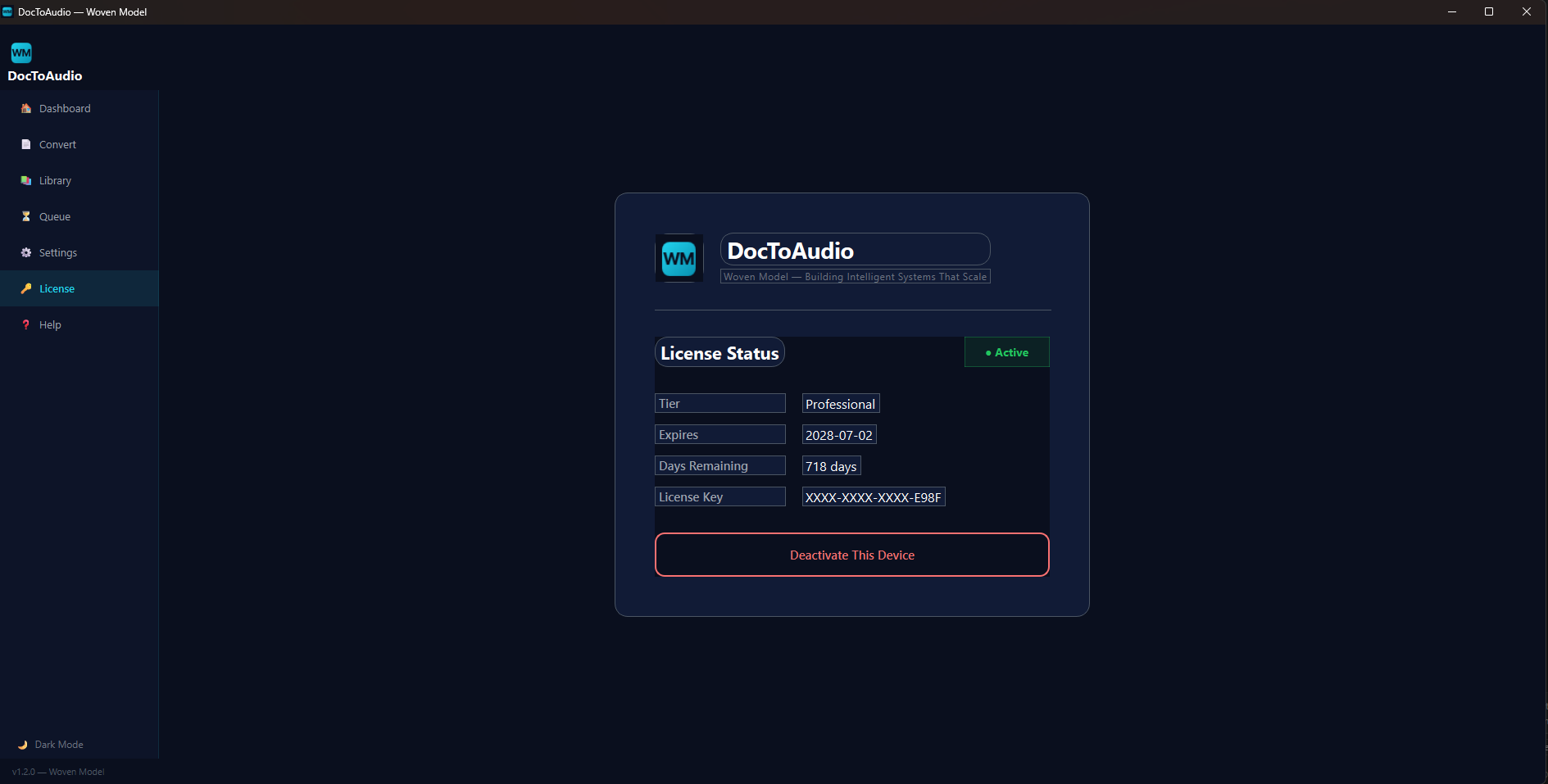
License Tab
Purpose: License activation, 14-day free trial management, and deactivation.
States
- Unlicensed: Activation form with key input + Start Free Trial button
- Trial Active: Displays days remaining, full features unlocked
- Licensed: Shows tier, expiry, days remaining, masked license key, and Deactivate button
- Expired: Redirects to License page, prompts for new key
Three Ways to Listen
DocToAudio is the only document-to-audio converter with three TTS engines built in. Choose based on your needs — no other tool offers this flexibility.
Local (SAPI5)
Windows built-in voices. No internet required. Basic quality but always available. Good for quick offline conversions.
Requires ffmpeg for MP3/OGG export
OpenAI
Premium GPT-4o neural voices. Best quality. Supports voice instructions for tone, accent, and style control. 10 voices available.
Requires API key. No ffmpeg needed.
Edge TTS
Microsoft Edge neural voices. No API key needed, no payment, no setup. 22+ natural voices, 100+ languages. The best all-around choice.
Requires internet. No ffmpeg needed.
Engine Comparison
| Feature | Local (SAPI5) | OpenAI | Edge (Free) |
|---|---|---|---|
| Internet Required | ❌ No | ✅ Yes | ✅ Yes |
| Cost | Free | ~$0.015/min | Free |
| Voice Quality | Basic | Excellent | Good (Neural) |
| Speed Control | ✅ 0.5x-3x | ✅ 0.25x-4x | ✅ Yes |
| Pitch Control | ✅ Yes | ❌ No | ✅ Yes |
| Languages | OS Voices | English only | 100+ |
| Voice Instructions | ❌ No | ✅ Yes | ❌ No |
| API Key Needed | ❌ No | ✅ Yes | ❌ No |
| ffmpeg Needed | For MP3/OGG | ❌ No | ❌ No |
| Voices | System | 10 | 22+ |
| Setup Time | None | 5 minutes | None |
Multilingual Audio Pipeline
Upload a document in any language and get an audiobook in another. The entire translation + TTS-optimization pipeline runs seamlessly in the background.
Import a Document
Upload a PDF, DOCX, EPUB, TXT, or RTF file — or paste text directly. Language is auto-detected using langdetect.
Select Target Language
Pick from 17 common languages (English, Spanish, French, German, Chinese, Japanese, etc.) with support for 100+ total.
Translate
Click "🌐 Translate Document". Translation runs in a background QThread with progress updates. Powered by Google Translate via deep-translator — free, no API key.
Speech Optimize
Translated text is automatically optimized for TTS: abbreviations expanded, semicolons replaced, comma chains split, parentheses inlined, long paragraphs broken.
Generate Audiobook
Add to the queue — the translated and optimized text is used for audio. Output filename includes the target language. Use Edge TTS for best multilingual voice support.
🔤 Language Detection
Uses langdetect for automatic source language identification from the first 2000 characters. Confidence score shown in UI.
🔄 Google Translate
Free neural translation via deep-translator. Paragraph-preserving — headings and structure maintained. Translations cached to disk.
✂️ TTS Optimizer
Custom tts_optimizer.py expands abbreviations (Dr. → Doctor, e.g. → for example), replaces punctuation, and ensures natural speech flow.
See the App in Action
Real screenshots from the running application showing every major page.
📊 Dashboard
📄 Convert Page
🔄 Conversion in Progress
📚 Audiobook Library
⚙️ Settings
🔑 License
Typical Use Cases
Basic: Document to Audiobook
1. Drag PDF to Convert page
2. Select Edge TTS (free, zero setup)
3. Click "Generate Preview" to test
4. Click "Add to Conversion Queue"
5. Find audiobook in Library → play
Multilingual: Translate + Convert
1. Import Spanish EPUB
2. Language auto-detects as "Spanish"
3. Select "English (en)" as output
4. Click "🌐 Translate Document"
5. Text is translated + TTS-optimized
6. Add to queue → "Title (English).mp3"
Batch: Queue Multiple Docs
1. Import and configure first document
2. Add to queue → Queue button
3. Import second document, change settings
4. Add to queue
5. Switch to Queue page to monitor all jobs
6. Retry any failures with one click
Technical Specifications
Supported Formats
- • PDF (PyMuPDF)
- • DOCX (python-docx)
- • EPUB (ebooklib + BeautifulSoup)
- • TXT, RTF
- • Clipboard paste
Audio Output
- • MP3 (128k–320k)
- • WAV
- • OGG
- • Auto-naming with target language
- • Chapter-aware chunking
Tech Stack
- • Python 3.11+ / PyQt6
- • pyttsx3 + edge-tts + openai
- • deep-translator + langdetect
- • SQLite database
- • PyInstaller for builds
Data Storage
- • Config: %APPDATA%\WovenModel\
- • Library DB: SQLite
- • Translation Cache: JSON
- • Preview Cache: %TEMP%
- • Default Output: AppData
Ready to Convert?
DocToAudio is available now. Get started with a 14-day free trial — all features unlocked, including the speech optimizer and all three TTS engines.
Windows only · Python 3.10+ required · Edge TTS free forever · No account needed for trial